
School transportation requires careful attention to passenger safety, driver behavior, road conditions, and the area surrounding the vehicle. School buses frequently stop near schools, residential streets, pickup points, and busy roads. Drivers must remain aware of students, pedestrians, cyclists, and other vehicles while managing changing traffic conditions.
A School Bus Camera System helps operators monitor these situations by providing video coverage inside and around the bus. Depending on the configuration, the system can record passenger activity, capture road conditions, support blind-spot awareness, and store footage for incident investigation. When connected to compatible mobile digital video recording equipment, it can also support remote fleet monitoring and video retrieval.
For school bus operators, fleet managers, bus manufacturers, and vehicle technology integrators, selecting the right School Bus Camera System involves more than choosing cameras. The system should match the vehicle layout, operational risks, recording requirements, and fleet management procedures.
MCY Technology provides vehicle camera and monitoring products for multiple vehicle applications, including school buses. Its product range includes cameras, monitors, mobile DVRs, and camera DVR kits that can be evaluated for different vehicle surveillance requirements.
What Is a School Bus Camera System?
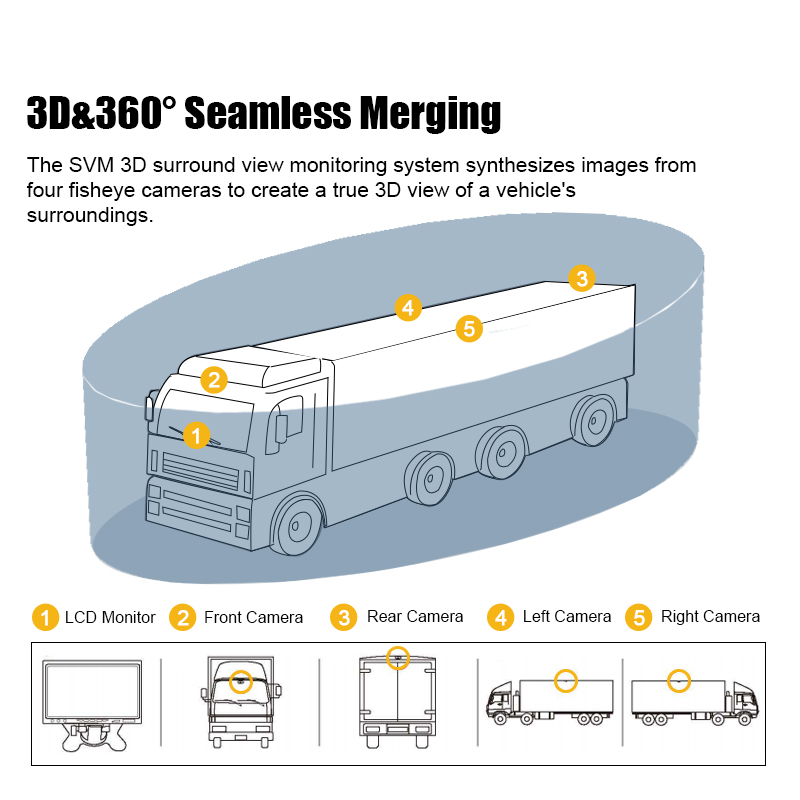
A School Bus Camera System is a vehicle surveillance solution designed to help operators monitor activity inside the bus and the surrounding driving environment. A typical configuration may include interior cameras, front-facing cameras, side-view or rear-view cameras, a monitor, and a mobile digital video recorder (MDVR).
The exact arrangement depends on the bus design and the operator’s priorities. Some fleets focus on passenger monitoring and incident documentation, while others need broader coverage of the road, vehicle entrances, and exterior blind spots.
A properly planned School Bus Camera System can help address several operational needs:
- Monitoring passenger activity inside the vehicle.
- Recording road conditions and driving events.
- Supporting driver awareness around selected blind spots.
- Reviewing incidents, complaints, and vehicle damage.
- Organizing video evidence for internal investigations.
- Supporting remote fleet supervision when compatible connectivity is available.
Camera coverage, recording, AI functions, and remote access are not identical across all systems. Buyers should confirm which functions are included in the proposed configuration before placing an order.
Why Is a School Bus Camera System Important?
1. Improve Visibility Around the Bus
School buses are large vehicles, and their body structure can restrict the driver’s view of certain areas. Children may be difficult to see when they are near the front, rear, or sides of the bus, particularly during low-speed maneuvering.
A School Bus Camera System can provide additional visual information through appropriately positioned cameras and a compatible in-cab display. Depending on the selected setup, drivers may be able to review areas that are difficult to observe through mirrors alone.
Exterior camera coverage is especially relevant when buses reverse into depots, turn through narrow streets, approach school entrances, or maneuver in crowded pickup areas.
Camera systems should complement, rather than replace, mirrors, direct observation, safe driving procedures, and established student-loading protocols. Installation and camera positioning should be evaluated carefully to ensure that the intended areas are visible.
2. Monitor Passenger Activity Inside the Bus
Passenger monitoring is another important function of a School Bus Camera System. Interior cameras can record activity in the passenger compartment, helping operators review events such as disputes, suspected misconduct, accidental injuries, or damage to the vehicle.
When an incident is reported, authorized staff can review the relevant footage to better understand the circumstances. This can support fairer internal investigations and help schools or transport providers respond to complaints using recorded information rather than relying exclusively on conflicting accounts.
Interior monitoring requirements vary by region and organization. Before deployment, operators should define where cameras will be installed, who may access recordings, how long footage will be retained, and how students, parents, and staff will be informed in accordance with applicable privacy rules.
3. Support Driver Safety and Responsible Driving
School bus drivers must manage traffic, passenger safety, scheduled stops, and changing road conditions. A suitable camera system can provide recorded information for reviewing driving events and improving operational procedures.
Depending on the selected equipment, a vehicle surveillance solution may also integrate driver monitoring or advanced driver assistance functions. For example, MCY’s Camera DVR Kits page describes mobile DVR configurations with functions such as ADAS warnings and driver behavior analysis.
These functions may help identify selected risks, such as signs of driver distraction or potential forward-collision hazards, when the required hardware and software are included. Buyers should verify the precise functions and supported camera inputs for their chosen system.
Video review can also support driver training. Fleet supervisors may use recorded events to discuss safe stopping, reversing, turning, and interaction with other road users. The objective should be to identify risks and improve procedures, not simply to collect footage.
4. Preserve Video Evidence for Incident Investigation
When a traffic incident, passenger complaint, or vehicle damage event occurs, reliable footage can help clarify what happened. Without a recording, an operator may have to rely on written reports, witness statements, and incomplete recollections.
A School Bus Camera System connected to a compatible recorder can preserve relevant video from the installed cameras. Authorized personnel may then review the footage to understand the sequence of events and support internal reporting or discussions with relevant parties.
For evidence management, buyers should consider:
- Which camera views need to be recorded.
- Whether recording should run continuously or use event-based triggers.
- How footage is stored and protected against loss.
- How authorized staff can search, export, and review recordings.
- How retention periods and access permissions are managed.
MCY’s Mobile DVR products include configurations supporting video storage, playback, GPS positioning, and remote video monitoring. Availability varies by model and configuration, so buyers should confirm compatibility with their intended School Bus Camera System.
Key Components of a School Bus Camera System
Interior and Exterior Cameras
Interior cameras capture activity in selected areas of the passenger compartment. Exterior cameras can monitor the road ahead, the rear of the bus, or other areas where additional visibility is needed.
Camera placement should be based on the bus layout, seating arrangement, entrances, and known blind spots. The goal is to provide useful coverage without creating unnecessary overlap or leaving important areas outside the camera view.
Monitor and Driver Display
A monitor allows the driver to view selected camera feeds where real-time viewing is required. Screen placement should be considered carefully so that the display remains useful without distracting the driver from the road.
The number of camera views displayed at one time and the ability to switch views depend on the selected equipment.
Mobile Digital Video Recorder
An MDVR records video from compatible cameras and provides a way to store and retrieve footage. Depending on the model, it may support multiple video inputs, GPS data, wireless connectivity, or remote monitoring.
For a school bus fleet, recording capability is particularly important because footage may be needed after an incident that is not reported immediately. Buyers should evaluate storage capacity, recording settings, file export, and maintenance requirements.
Optional AI and Remote Monitoring Functions
Some School Bus Camera System configurations can be combined with AI-based driver monitoring, advanced driver assistance, or blind-spot detection. These functions are configuration-dependent and should not be assumed to come with every camera or recorder.
Remote monitoring may also be available through compatible equipment and software. Where used, it can help authorized staff review vehicle status or video without physically visiting the bus, subject to connectivity, system configuration, and data access policies.
How to Choose the Right School Bus Camera System
The best configuration depends on how the bus operates, which risks the operator wants to address, and how video will be used after recording.
1. Identify the Main Monitoring Requirements
Begin by listing the areas and events that need to be monitored. For example, a school bus operator may prioritize passenger activity, the road ahead, rear visibility, or the area around the vehicle during reversing.
Create a camera coverage plan before selecting equipment. This makes it easier to determine the number and placement of cameras, the required display arrangement, and the recording needs.
2. Check Camera and Recorder Compatibility
A camera system must work as a complete installation. Confirm that camera outputs, video inputs, recording equipment, monitors, and cables are compatible.
For fleet buyers and vehicle modification companies, compatibility is especially important when upgrading buses that already have surveillance equipment. Reusing existing components may be possible in some cases, but it should be confirmed against the selected system’s requirements.
3. Evaluate Video Quality and Recording Storage
Video should be clear enough for its intended use under the operating conditions expected by the fleet. Consider daytime and low-light conditions, camera positioning, lens coverage, and whether important details remain visible in recorded footage.
Storage planning is equally important. Estimate how many cameras will record, how often the bus operates, and how long footage needs to be retained. Recording quality, frame rate, camera count, and recording mode all affect storage requirements.
Ask the supplier to explain how footage is retrieved and whether the proposed recorder supports the required retention and export workflow.
4. Consider AI Driver Assistance and Blind-Spot Detection
AI-based functions may provide additional support for driver safety. Depending on the configuration, ADAS may offer selected warnings related to forward collision risks or lane departure, while blind-spot detection may help identify pedestrians or vehicles in monitored areas.
Driver monitoring systems may also detect selected behaviors, such as distraction or drowsiness. These features have different purposes and should be evaluated separately.
Before ordering, confirm the functions included in the proposed School Bus Camera System, the conditions under which warnings operate, and how alerts are presented to the driver. No camera or AI feature should be treated as a substitute for responsible driving or a complete safety program.
5. Review Installation and Maintenance Needs
Installation quality affects camera coverage, reliability, and ease of use. Camera angles, mounting positions, cable routing, power supply, recorder placement, and monitor visibility should be checked against the actual bus.
For operators managing many vehicles, also consider installation time, service access, replacement procedures, spare-part availability, and technical support. A consistent configuration across a fleet can simplify maintenance and help staff follow the same video retrieval procedures.
6. Plan Video Access and Privacy Management
School bus footage may contain children, drivers, and members of the public. Operators should establish policies for authorized access, secure storage, incident-related exports, retention periods, and deletion.
Where remote access is used, review account permissions and data transmission arrangements. Privacy and data protection requirements differ between markets, so the system and the operator’s procedures should be assessed against applicable local rules.
School Bus Camera System Applications Beyond School Transportation
Although designed around school transportation needs, vehicle camera technologies can also support other commercial and public transport applications.
Public transport operators may use camera systems to monitor passenger areas and document road incidents. Logistics and freight companies may prioritize exterior visibility, loading-area monitoring, and recorded evidence. Taxi operators may require cabin and road-facing coverage, while RV operators may focus on parking and reversing.
Industrial, construction, mining, and agricultural vehicles face different challenges, including restricted visibility around large equipment and activity in confined work areas. These applications may require different camera positions, mounting methods, and recorder configurations.
For importers, wholesalers, vehicle modification workshops, and system integrators, this makes configuration flexibility an important purchasing consideration. A system intended for a school bus should be selected according to its actual operating environment rather than assumed to suit every vehicle without modification.
MCY provides a range of vehicle monitoring products and application solutions. Visit the company’s Solutions page to explore relevant vehicle applications and discuss project-specific requirements.
Why Consider MCY Technology for a School Bus Camera System?
MCY Technology offers vehicle cameras, monitors, mobile DVRs, and camera DVR kits for vehicle surveillance applications. Its website also presents solutions for school buses and other vehicle categories.
For school bus operators, the selection process should start with practical requirements: which areas need monitoring, what type of footage must be retained, whether remote access is required, and whether additional driver-assistance functions are needed.
For overseas importers, wholesalers, bus manufacturers, and vehicle modification companies, the project may also involve integration with existing electrical systems, different vehicle layouts, or market-specific requirements. These details should be discussed before the final configuration is confirmed.
When contacting MCY, prepare the following information:
- Bus type and vehicle layout.
- Number of cameras and areas requiring coverage.
- Whether interior, exterior, or both types of monitoring are needed.
- Recording, storage, GPS, or remote monitoring requirements.
- Any required ADAS, driver monitoring, or blind-spot detection functions.
- Existing equipment that may need to be integrated.
- Target quantity, installation needs, and project schedule.
Providing these details helps the supplier assess the application and discuss an appropriate configuration without assuming that every feature is available in every product.
Frequently Asked Questions About School Bus Camera Systems
What does a School Bus Camera System monitor?
Depending on camera placement, it can monitor the passenger compartment, the road ahead, the rear of the bus, and selected exterior areas. The actual coverage depends on the cameras installed and the system configuration.
Can a School Bus Camera System record video for incident investigations?
Yes, when connected to compatible recording equipment. A mobile DVR can store footage from supported cameras for later review. Buyers should confirm recording modes, storage capacity, retention requirements, and the process for exporting video.
Can school bus cameras support remote fleet monitoring?
Some configurations support remote video monitoring through compatible connectivity and software. Availability depends on the selected recorder, network connection, platform, and system setup.
Does every School Bus Camera System include AI functions?
No. AI functions such as driver monitoring, ADAS warnings, and blind-spot detection depend on the selected hardware and configuration. Buyers should verify the exact functions included before purchasing.
How many cameras does a school bus need?
There is no single camera count suitable for every bus. The number depends on the areas that need monitoring, vehicle dimensions, interior layout, blind spots, and recording requirements. A coverage assessment is a practical starting point.
Can MCY’s camera systems be customized for different buses?
MCY offers vehicle monitoring products and solutions for different applications. Specific customization and integration requirements should be discussed with the company, including camera placement, recorder compatibility, display needs, and required functions.
Conclusion: Choose a School Bus Camera System That Fits Your Fleet
A well-planned School Bus Camera System can help improve visibility, monitor passenger activity, document driving events, and support incident investigation. When combined with compatible recording and monitoring equipment, it can also contribute to more organized fleet supervision.
Choosing the right solution requires evaluating camera coverage, recording needs, storage, optional safety functions, installation, and privacy management. School bus operators should prioritize the risks and workflows that matter most to their fleet rather than selecting equipment based only on the number of cameras or advertised features.
MCY Technology provides vehicle camera and monitoring products for school buses and other commercial vehicle applications. Contact MCY to discuss a School Bus Camera System tailored to your vehicle layout, fleet safety priorities, video evidence requirements, and integration needs.
Website: https://www.mcytech.com/
Email: sales@mcytech.com
Phone: +86-760-86638369
Post time: Oct-27-2026