
A Camera Monitor System (CMS) is an electronic vision solution that uses cameras and in-cabin displays to provide drivers with views of the vehicle’s surroundings. Designed for applications such as trucks, buses, and other commercial vehicles, a CMS can replace conventional exterior mirrors in suitable configurations, helping drivers observe surrounding traffic and areas that may be difficult to see.
As commercial vehicles become increasingly equipped with electronic vision technologies, Camera Monitor Systems are gaining attention as an alternative to traditional mirror arrangements. By combining external cameras with strategically positioned displays, a CMS can provide real-time visual information while offering flexibility in vehicle design and installation.
MCY Technology Limited provides vehicle vision solutions for commercial applications, including electronic side-mirror and Camera Monitor System configurations. This guide explains how a CMS works, the different configuration options available, and the key factors to consider when selecting a solution for commercial vehicles.
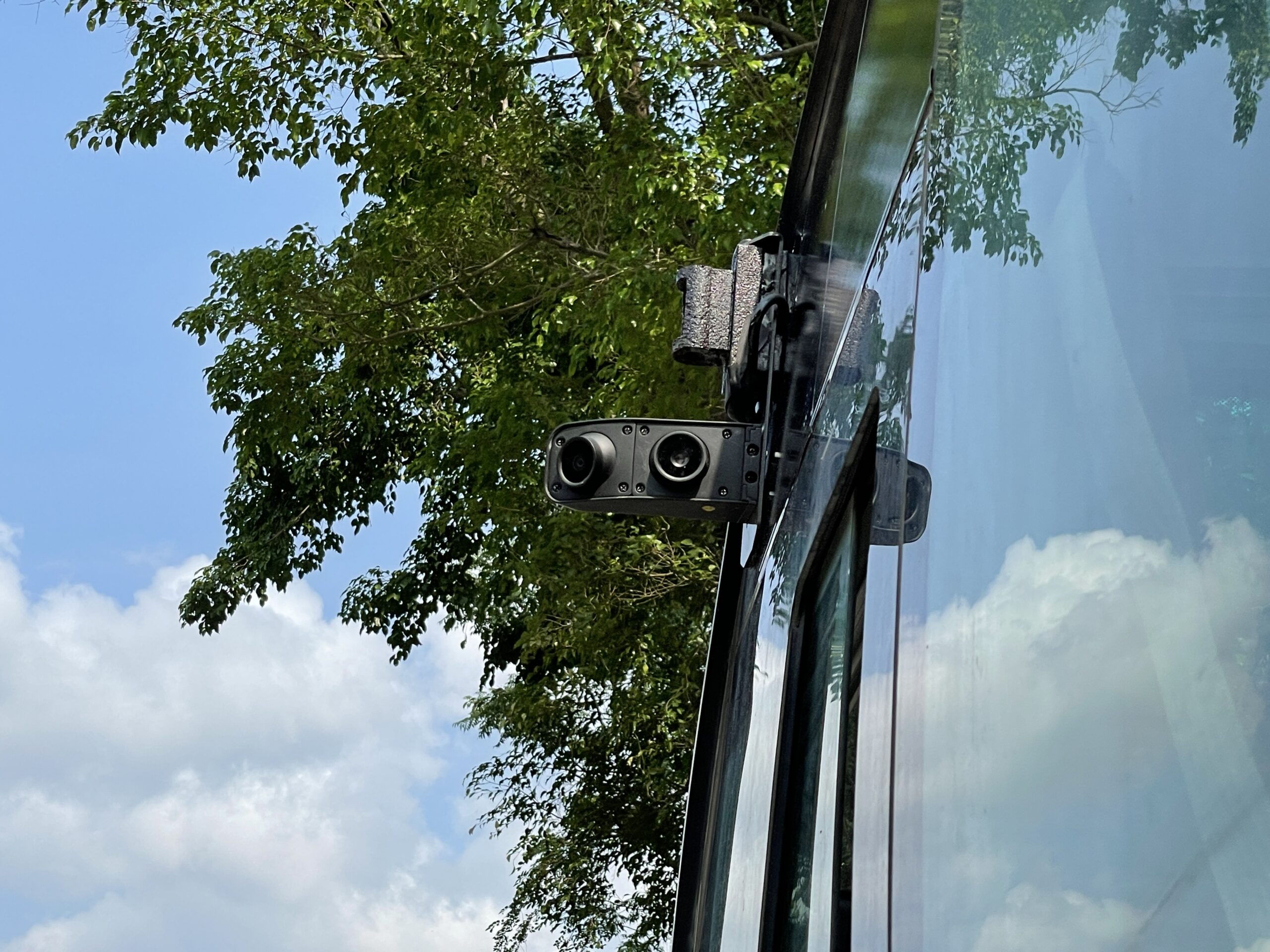
What Is a Camera Monitor System (CMS)?
A Camera Monitor System (CMS) is an electronic system designed to display images captured by cameras mounted around a vehicle. Instead of relying entirely on conventional exterior mirrors, drivers view camera images on monitors installed inside the cabin.
A typical CMS consists of three main components:
1. External Cameras
Cameras are mounted at suitable positions on the vehicle to capture images of the surrounding environment. Their locations and viewing angles depend on the vehicle design and required viewing areas.
2. In-Cabin Monitors
Displays installed inside the cabin show the images captured by the cameras. Screen size, mounting position, and image layout can be selected according to the vehicle configuration and driver requirements.
3. Image Transmission and Processing
Electronic components transmit camera images to the monitors and may process the images to support features such as brightness adjustment and image enhancement, depending on the selected configuration.
By integrating these components, a Camera Monitor System provides an electronic approach to indirect vision for suitable commercial vehicle applications.
How Does a Camera Monitor System Work?
A Camera Monitor System follows a straightforward process to provide drivers with visual information about their surroundings.
Step 1: Capture the Surrounding Environment
External cameras continuously capture images of traffic, nearby vehicles, and other objects within their designated fields of view.
Step 2: Transmit Camera Images
The captured images are transmitted to the in-cabin displays through the system’s supported connection and processing architecture.
Step 3: Display Real-Time Images
The monitors present the camera images in the driver’s field of view, allowing the driver to observe relevant areas around the vehicle without relying solely on traditional exterior mirrors.
Step 4: Support Driver Observation
Depending on the camera positioning, image quality, display layout, and available functions, a CMS can help drivers assess surrounding traffic and identify potential visibility limitations.
The effectiveness of a Camera Monitor System depends on its overall design, installation, viewing angles, image performance, and compatibility with the intended vehicle.
Types of Camera Monitor Systems for Commercial Vehicles
Different commercial vehicles have different dimensions, cabin layouts, and visibility requirements. A Camera Monitor System can therefore be configured in several ways to suit specific applications.
1. Electronic Side-Mirror CMS
An electronic side-mirror CMS uses external cameras and in-cabin displays to provide side and rearward views that would traditionally be provided by exterior mirrors.
This configuration is relevant to trucks, buses, and other suitable commercial vehicles. Camera placement and monitor positioning must be selected according to the vehicle design and required viewing areas.
For product configurations and available options, explore MCY’s E-Side Mirror Solutions.
2. CMS Configurations for Different Viewing Areas
Commercial vehicle vision requirements may involve different viewing areas, depending on vehicle category and applicable regulations.
For vehicles subject to UNECE indirect vision requirements, Class II is associated with main rearward vision, Class IV with wide-angle vision, Class V with close-proximity vision, and Class VI with front vision, where applicable.
A Camera Monitor System may be configured with different camera positions and displays to support the required viewing areas. However, the appropriate configuration depends on the vehicle, installation, and applicable approval requirements.
Before selecting a CMS for a regulated application, confirm that the specific product configuration meets the relevant requirements.
3. CMS Configurations with Multiple Displays
Some commercial vehicle applications may require more than one monitor to present images from different camera positions.
Multiple-display configurations can help organize different views within the cabin. The number of monitors, their screen sizes, and their mounting positions should be determined according to the driver’s viewing needs and the available cabin space.
The final arrangement should allow drivers to interpret camera images clearly without creating unnecessary visual distraction.
Key Features of MCY Camera Monitor Systems
MCY Camera Monitor Systems combine high-definition imaging with image-enhancement and visibility-supporting features designed for commercial vehicle applications. Depending on the selected configuration, these features can help drivers view their surroundings in different lighting and weather conditions.
1. 1080P High-Definition Imaging
1080P high-definition imaging provides detailed camera images on the in-cabin monitor, helping drivers observe surrounding traffic and road conditions.
2. Wide Dynamic Range (WDR) Technology
WDR technology helps balance bright and dark areas in an image, supporting visibility in environments with significant lighting differences, such as when driving between bright outdoor areas and tunnels.
3. Glare Reduction
Glare reduction helps manage the effects of strong light sources, such as direct sunlight and vehicle headlights, supporting clearer image viewing in challenging lighting conditions.
4. Clear Vision in Different Weather Conditions
Designed for use in varying weather conditions, compatible camera configurations can support visibility in environments affected by rain, snow, and other challenging conditions. Actual performance depends on the camera design, lens treatment, and operating environment.
5. Low-Light Visibility
Low-light imaging helps capture useful image details in dim environments, supporting driver observation during nighttime driving and in areas with limited illumination.
6. Automatic Camera Heating
The automatic heating function helps manage frost and ice buildup on compatible cameras in cold environments, supporting camera visibility when temperatures drop. Its operation depends on the selected model and environmental conditions.
Image Performance in Different Driving Conditions
A Camera Monitor System may operate under a wide range of lighting and weather conditions. Understanding the available image-enhancement features can help buyers evaluate whether a particular configuration suits their application.
Wide Dynamic Range (WDR)
Wide Dynamic Range technology helps balance bright and dark areas within an image. It can support image visibility in scenes with significant lighting differences, such as when a vehicle enters or exits a tunnel.
Glare Reduction
Strong sunlight and vehicle headlights can affect camera images. Glare-reduction features help manage excessive brightness and support image visibility in challenging lighting conditions.
Actual performance depends on the camera design, optical components, and image-processing capabilities.
Automatic Brightness Adjustment
Compatible displays may adjust their brightness according to ambient lighting conditions. This can help maintain comfortable viewing as lighting changes between daytime and nighttime driving.
Low-Light Imaging
Low-light imaging capabilities help cameras capture useful details when illumination is limited. This feature may be valuable for commercial vehicles operating at night or in poorly lit areas.
Rain and Water Management
Water droplets and dirt on a camera lens can reduce image clarity. Depending on the camera design, lens treatment, and installation, water-repellent features may help manage water accumulation on the lens.
Heating for Cold Conditions
In cold environments, frost or ice can obstruct the camera’s view. Compatible heating features may help reduce frost and ice buildup, depending on the operating conditions and product configuration.
Not every Camera Monitor System includes all these features. Buyers should review the specifications of the selected model to determine which capabilities are available.
Camera Monitor System Standards and Compliance
When selecting a Camera Monitor System for commercial vehicles, buyers should consider the regulations and approval requirements relevant to the intended application.
UNECE Regulation No. 46 (UN R46) addresses devices for indirect vision and their installation on applicable vehicles. Whether a particular CMS configuration is suitable for a regulated application depends on the product design, installation, vehicle category, and applicable requirements.
Other vehicle-related regulations may also apply, depending on the market and product configuration.
Before purchasing or integrating a CMS, buyers should verify the certification documents, approval scope, and compatibility of the specific model with the intended vehicle.
MCY can discuss project requirements and available product configurations to help customers identify the specifications and approvals that need to be confirmed.
Applications of Camera Monitor Systems
Camera Monitor Systems can support different commercial vehicle applications when configured to meet the relevant visibility and installation requirements.
Trucks
For trucks, a suitable CMS can provide side and rearward views through external cameras and in-cabin displays. Camera positioning and monitor layout should account for vehicle dimensions and driver visibility requirements.
Buses
For buses, CMS configurations can be selected according to vehicle design, cabin layout, and the viewing areas required by the driver.
Heavy-Duty Commercial Vehicles
Heavy-duty vehicles may have specific installation constraints and demanding operating conditions. Camera selection, mounting arrangements, environmental protection, and display positioning should be evaluated for each application.
OEM and Vehicle Integration Projects
Vehicle manufacturers and system integrators may require customized camera positions, monitor sizes, mounting arrangements, or additional functions.
A configurable CMS can support these requirements when the selected components and overall design are compatible with the intended vehicle.
Why Choose MCY for Camera Monitor System Solutions?
MCY Technology Limited develops vehicle vision solutions for commercial vehicle applications, including electronic side-mirror and Camera Monitor System configurations.
For OEM, ODM, and vehicle integration projects, MCY can discuss product selection and customization based on project requirements.
Areas for evaluation may include:
- Camera and monitor combinations.
- Display sizes and mounting options.
- Image-enhancement features available on selected models.
- Optional functions according to hardware and software configuration.
- OEM/ODM customization for suitable projects.
When evaluating a CMS supplier, buyers should consider technical compatibility, product documentation, customization capabilities, and the supplier’s ability to support the intended application.
To explore available camera and monitor configurations, visit MCY’s E-Side Mirror Solutions.
FAQ
What is a Camera Monitor System (CMS)?
A Camera Monitor System (CMS) uses external cameras and in-cabin displays to provide drivers with views of the vehicle’s surroundings. It can serve as an electronic indirect vision solution for suitable commercial vehicle applications.
Can a Camera Monitor System replace traditional mirrors?
A CMS can replace conventional mirrors in suitable vehicle configurations, subject to applicable regulations and approval requirements. The system must meet the relevant visibility and installation requirements for the intended vehicle.
Can a Camera Monitor System be used for trucks and buses?
Yes. Camera Monitor Systems can be configured for suitable trucks, buses, and other commercial vehicles. Camera positions, monitor sizes, and viewing areas depend on the vehicle design and application requirements.
Does every Camera Monitor System include blind spot detection?
No. A basic CMS provides camera images on in-cabin displays. Blind spot detection requires compatible detection hardware and software and is available only on supported configurations.
Contact MCY for Camera Monitor System Solutions
Looking for a Camera Monitor System for trucks, buses, or other commercial vehicles?
MCY Technology Limited provides camera and monitor solutions for commercial vehicle applications, with OEM/ODM customization options based on project requirements.
Contact MCY Technology today to discuss your fleet’s specific requirements, request product information, or explore OEM/ODM opportunities. Visit MCY’s official website to learn more and connect with our team.
Post time: Oct-23-2026